How to Enroll in a Class
Choose your class and log in to MyCSUN to self-enroll and pay. It’s that easy.
Take note of the prerequisite requirements. A prerequisite is a course or condition that must be completed/met prior to enrollment in another specified course.
For those who have never taken a class at CSUN or are returning Alumni, please visit Open University on how to take a class during the Winter Session.
Login to MyCSUN. Students may self-enroll in a class once the once the enrollment period begins (see Calendar). Payment will be due in full at the time of enrollment.
A student who has not completed full payment within 72 hours of registering will be dropped.
For any login issues, please visit CSUN IT Help Center.
Winter Term Self-Enrollment Steps:
Before you enroll in classes, change your browser settings to allow pop-ups for payment transactions.
- Browse courses at CSUN Class Search (filter by "The Tseng College - Credit")
- Enroll in your class through the CSUN Portal Student Center
- Within the Student Center, click on "Winter Enrollment"
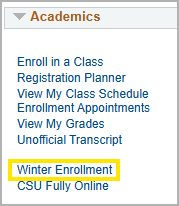
- Select the appropriate Program to Enroll option and enter "Winter" as the term to enroll
- Enter the 5-digit class number or click "Class Search"
- Click "Next" to finish enrolling
- Within the Student Center, click on "Winter Enrollment"
- Pay within 72 hours to avoid being dropped for non-payment. You must make a full payment within 72 hours of adding the course to maintain your enrollment. Otherwise, you will be dropped from your class.
- Payment methods: Visa, MasterCard, American Express, or Electronic Check (must wait 24 hours after account activation to pay by Electronic Check).
Wait List
The CSUN wait list feature is not available for the Winter Term.
Enrollment Requirements
Maximum Unit Load:
- All Students may enroll in 4 units maximum in the Winter Term.
To request up to 6 units maximum, students in good standing may request additional units by completing the Extra Unit Authorization form.
The associate dean of your major (or Undergraduate Studies for Exploratory majors) will review this request and email you with the decision. If approved, your Extra Unit Authorization form will be forwarded to the Office of the Registrar for processing. You can add approved extra units, provided there is space available or you have a permission number, beginning with the Nonrestrictive Registration period published in the Registration Calendar.
Adding a Class After the Add/Drop Period
This process applies only to undergraduate courses. Students must complete the Late Change Form and include an email from the instructor confirming permission to add the class after the deadline. Submit both documents to Undergraduate Studies at ugs@csun.edu for approval.